How AI Saves Time on Repetitive Business Tasks
Introduction
Every business has repetitive tasks.
Employees may spend hours responding to similar emails, entering information into spreadsheets, scheduling appointments, organizing documents, creating reports, updating customer records, processing requests, or moving information between different systems. While these activities may be necessary, they can consume valuable time that could otherwise be spent on strategic and creative work.
This is where artificial intelligence can make a significant difference.
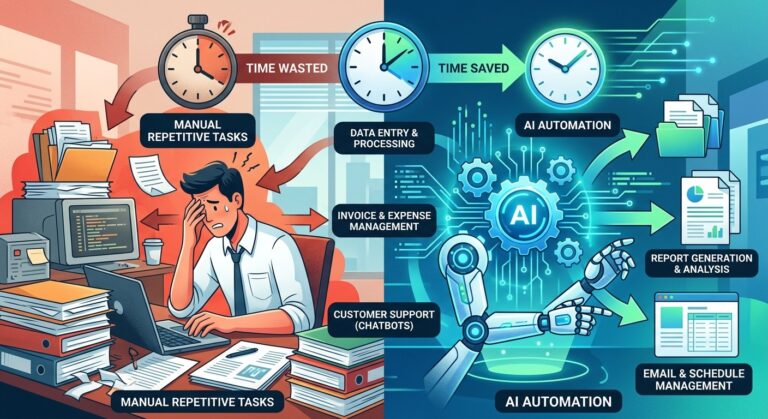
AI can automate many repetitive business tasks, helping organizations reduce manual work and improve the way employees spend their time. Instead of requiring people to repeatedly perform the same process, AI-powered systems can handle routine activities automatically while employees focus on tasks that require judgment, creativity, communication, and problem-solving.
AI automation is becoming an important part of modern business operations because saving time is not simply about getting more work done. It is also about helping people work smarter.
What Are Repetitive Business Tasks?
Repetitive business tasks are activities that employees perform regularly using the same or similar steps.
Examples include:
- Answering frequently asked questions
- Entering customer information
- Sending routine emails
- Scheduling meetings
- Updating databases
- Generating basic reports
- Sorting documents
- Processing forms
- Organizing files
- Tracking orders
- Following up with leads
- Creating standard notifications
- Transferring data between applications
- Categorizing customer inquiries
- Preparing recurring summaries
These tasks can take only a few minutes individually, but their combined time can become substantial over weeks and months.
AI provides an opportunity to automate many of these processes.
How AI Saves Time for Businesses
AI saves time by taking over predictable and repetitive activities that traditionally require manual attention.
Instead of an employee performing every step, an AI-powered workflow can identify information, process it, make basic decisions according to predefined rules, and trigger the next action.
For example, imagine a company receives hundreds of customer inquiries every week.
Without automation, employees may need to:
- Open each message.
- Read the question.
- Identify its category.
- Find the appropriate response.
- Send a reply.
- Update the customer record.
- Forward complex issues to another department.
An AI-powered system can automate many of these steps. It can classify the inquiry, provide an appropriate response, update information, and escalate the conversation when human assistance is necessary.
The result is less repetitive work for employees and faster service for customers.
AI Automates Email and Communication Tasks
Email is one of the most time-consuming activities in many organizations.
Employees frequently receive messages that require similar responses or routine actions. AI can help organize incoming communication, summarize long messages, draft responses, identify important requests, and route emails to the appropriate person.
For example, AI can help a customer service team identify whether an email concerns:
- Billing
- Technical support
- Product information
- Refunds
- Account questions
- Sales inquiries
Instead of manually sorting every message, employees can focus on the requests that require human attention.
AI can also assist with drafting routine responses, allowing employees to review and personalize the message before sending it.
This creates a faster communication workflow without eliminating human oversight.
AI Reduces Manual Data Entry
Data entry is another common repetitive business activity.
Employees may need to transfer information from emails, forms, invoices, customer conversations, or documents into business systems.
AI can help extract relevant information and organize it automatically.
For example, an AI system can identify:
- Customer names
- Contact information
- Order numbers
- Invoice details
- Product information
- Dates
- Transaction amounts
- Support request categories
Once the information is identified, an automated workflow can send it to the appropriate database or business application.
This reduces repetitive typing and allows employees to spend more time analyzing and using the information rather than entering it manually.
AI Speeds Up Document Processing
Businesses deal with large numbers of documents every day.
Contracts, invoices, applications, forms, receipts, reports, and customer records can require significant amounts of manual processing.
AI can help read and categorize documents, extract relevant information, summarize content, and identify specific details.
For example, instead of manually reviewing hundreds of documents to find particular information, employees can use AI to locate important details much faster.
This can be particularly useful for administrative, finance, customer service, and operations teams.
AI Automates Customer Support
Customer support contains many repetitive interactions.
Customers often ask questions about:
- Business hours
- Pricing
- Product availability
- Account information
- Order status
- Shipping
- Returns
- Basic troubleshooting
AI-powered chatbots and virtual assistants can handle many common questions instantly.
This means employees do not need to answer the same basic question repeatedly.
Human agents can instead focus on complex problems that require empathy, judgment, negotiation, or specialized knowledge.
AI does not necessarily replace customer support employees. In many cases, it acts as a first layer of assistance that helps human teams work more efficiently.
AI Helps Automate Scheduling
Scheduling meetings and appointments can involve unnecessary back-and-forth communication.
AI-powered scheduling systems can help coordinate calendars, identify available times, send reminders, and manage changes.
Instead of exchanging multiple emails to determine when everyone is available, an automated system can handle much of the coordination.
This saves time for employees, managers, customers, and clients.
Scheduling automation can be especially useful for businesses that manage large numbers of appointments or meetings.
AI Automates Lead Management
Sales teams often spend considerable time organizing and following up with potential customers.
AI can automate parts of the lead management process.
For example, an AI system can:
- Capture new leads
- Organize customer information
- Categorize prospects
- Identify potential high-value leads
- Send follow-up messages
- Schedule reminders
- Update customer records
- Notify sales representatives about important opportunities
This allows sales teams to spend less time on administrative work and more time building relationships and closing opportunities.
AI Simplifies Report Creation
Business reporting often involves collecting information from different sources, organizing it, and creating summaries.
AI can help automate parts of this process.
An AI system can analyze structured information, identify trends, summarize results, and generate draft reports.
For example, a manager may need a weekly summary of customer support activity.
Instead of manually reviewing hundreds of records, AI can help summarize:
- Number of customer requests
- Common issues
- Response times
- Frequently asked questions
- Escalated cases
- Customer feedback
Employees can then review the information and use it to make better decisions.
AI Automates Routine Marketing Activities
Marketing teams also deal with repetitive work.
AI can help with tasks such as:
- Drafting content
- Organizing campaign information
- Segmenting audiences
- Creating content variations
- Summarizing campaign performance
- Generating ideas
- Scheduling routine communications
- Analyzing customer interactions
Automation allows marketers to spend more time developing strategies and creative campaigns instead of repeatedly handling administrative processes.
The most effective approach combines AI automation with human creativity and strategic thinking.
AI Reduces Repetitive Administrative Work
Administrative tasks may not appear particularly difficult, but they can consume a significant amount of employee time.
AI can assist with:
- Form processing
- Calendar management
- File organization
- Data categorization
- Internal notifications
- Meeting summaries
- Task assignment
- Routine documentation
- Information retrieval
By automating these processes, businesses can reduce the amount of time employees spend on low-value administrative activities.
AI Helps Employees Focus on Higher-Value Work
One of the biggest benefits of AI automation is not simply completing tasks faster.
It is giving employees more time for important work.
When repetitive tasks are automated, employees can spend more time on:
- Strategy
- Creativity
- Problem-solving
- Customer relationships
- Product development
- Decision-making
- Research
- Innovation
- Business development
This can improve both productivity and employee satisfaction.
People generally provide greater value when they are able to use their expertise rather than repeatedly performing predictable tasks.
AI Can Work Around the Clock
Another advantage of automation is that software-based AI systems can operate continuously.
A traditional manual workflow depends on employees being available.
An automated workflow can continue processing requests outside normal working hours.
For example, an AI customer support system can respond to common questions at night. An automated workflow can organize incoming information while employees are away. A system can also prepare notifications or route requests without waiting for someone to manually process them.
This can help businesses maintain faster operations without requiring employees to work continuously.
AI Reduces the Cost of Repetitive Work
Time is a business resource.
When employees spend several hours each week performing repetitive tasks, the organization is effectively spending labor resources on activities that may be automated.
AI can reduce the amount of manual effort required for certain processes.
The financial impact can come from several areas:
- Less administrative workload
- Faster processing
- Fewer manual errors
- Better employee productivity
- Faster customer responses
- More efficient workflows
- Improved resource allocation
The goal should not be to automate everything.
Instead, businesses should identify processes where automation provides meaningful value.
AI Can Reduce Human Error
Repetitive work can become difficult to maintain consistently, especially when employees perform the same task hundreds or thousands of times.
Manual data entry, copying information, sorting records, and processing routine requests can result in mistakes.
AI automation can perform standardized processes consistently.
For example, an automated workflow can follow the same instructions every time it processes a particular type of request.
However, automation is not automatically error-free. AI systems still need accurate instructions, quality data, monitoring, and human oversight.
The best approach is to use automation to reduce unnecessary errors while maintaining appropriate review processes.
How Small Businesses Can Use AI Automation
AI automation is not limited to large corporations.
Small businesses can benefit from automating simple processes such as:
- Customer inquiries
- Appointment scheduling
- Lead follow-ups
- Email organization
- Invoice processing
- Social media content assistance
- Data entry
- Document organization
- Customer feedback collection
Small teams can benefit significantly because employees often handle multiple responsibilities.
Automating repetitive tasks can give a small team more capacity without requiring every additional task to be handled manually.
How to Identify Tasks That Should Be Automated
Businesses should not begin by asking, “What can AI do?”
A better question is:
“Which repetitive tasks are consuming valuable employee time?”
Start by reviewing daily and weekly workflows.
Look for tasks that are:
- Repeated frequently.
- Based on predictable steps.
- Time-consuming.
- Rule-based.
- Easy to measure.
- Low-risk when automated.
- Currently causing bottlenecks.
These are often strong candidates for automation.
For example, if an employee spends two hours every day sorting customer requests into categories, that process may be an excellent automation opportunity.
A Practical AI Automation Strategy
Businesses can approach automation gradually.
Step 1: Identify Repetitive Work
Document common tasks employees perform every day or week.
Step 2: Measure the Time
Determine how much time each task consumes.
Step 3: Prioritize Opportunities
Start with repetitive activities that provide significant time savings without creating unnecessary risk.
Step 4: Select the Appropriate AI Solution
Choose technology based on the actual workflow rather than adopting AI simply because it is popular.
Step 5: Test the Process
Begin with a limited workflow and monitor the results.
Step 6: Keep Human Oversight
Employees should review important AI-generated outputs and handle situations requiring judgment.
Step 7: Measure Results
Track improvements such as:
- Hours saved
- Processing speed
- Error rates
- Response times
- Employee productivity
- Customer satisfaction
Step 8: Improve the Workflow
Automation should evolve as the business learns what works and what does not.
The Importance of Human Oversight
AI automation works best when humans remain involved where human judgment matters.
Not every business task should be automated.
Sensitive decisions, complex customer situations, strategic decisions, and unusual cases may require human expertise.
A strong automation strategy creates a partnership between people and technology.
AI handles predictable work.
People handle complexity.
This combination can create a more efficient and flexible organization.
The Future of AI and Repetitive Business Tasks
AI automation is likely to become increasingly integrated into everyday business workflows.
Future systems will not simply perform individual tasks. They will increasingly connect multiple steps together.
For example, a customer inquiry could automatically trigger a sequence in which AI:
- Reads the request.
- Identifies the customer’s needs.
- Checks available information.
- Generates an appropriate response.
- Updates the customer record.
- Creates a follow-up task.
- Alerts an employee if human intervention is required.
This type of connected automation can transform entire workflows rather than simply automating individual tasks.
Businesses that learn how to use AI effectively can potentially create faster, more responsive, and more productive operations.
AI Automation and Employee Productivity
The value of AI should not be measured only by how many tasks a machine can perform.
A more important question is how much meaningful work employees can accomplish because repetitive work has been reduced.
When employees spend less time copying information, sorting emails, preparing routine reports, or answering identical questions, they can invest more time in activities that create value.
This can lead to a healthier relationship between technology and employees.
AI becomes a productivity tool rather than simply an automation tool.
Common Mistakes When Automating Repetitive Tasks
Businesses should avoid several common mistakes.
Automating a Bad Process
Automation cannot fix every inefficient workflow. If a process is poorly designed, automating it may simply make the problem happen faster.
Automating Too Much Too Quickly
Businesses should introduce automation gradually and evaluate results before expanding.
Ignoring Employees
Employees understand existing workflows better than anyone. Their feedback can help identify the best automation opportunities.
Forgetting Security
AI systems may process sensitive business and customer information. Security and access controls should be considered before implementation.
Removing Human Review Completely
Important workflows may still require human approval, especially when decisions have significant consequences.
How AI Saves Time Without Replacing Human Value
The biggest opportunity with AI automation is not simply replacing manual labor.
It is removing unnecessary work.
Employees bring qualities that automation cannot fully reproduce, including judgment, empathy, creativity, leadership, relationship building, and strategic thinking.
When AI handles repetitive processes, employees can spend more time using those strengths.
This creates an opportunity for businesses to become more productive while allowing people to focus on work that matters.
Final Thoughts
AI is changing the way businesses approach repetitive work.
From customer support and data entry to scheduling, reporting, communication, sales, and administration, AI can automate many predictable processes that traditionally consume employee time.
The greatest benefit is not simply faster task completion. AI can give employees more time to think, create, solve problems, communicate with customers, and contribute to business growth.
For businesses looking to improve efficiency, the best starting point is simple: identify the repetitive tasks that consume the most time and determine where AI can safely take over part of the workload.
When implemented thoughtfully, AI automation can turn hours of repetitive work into streamlined workflows and help businesses build a more productive future.