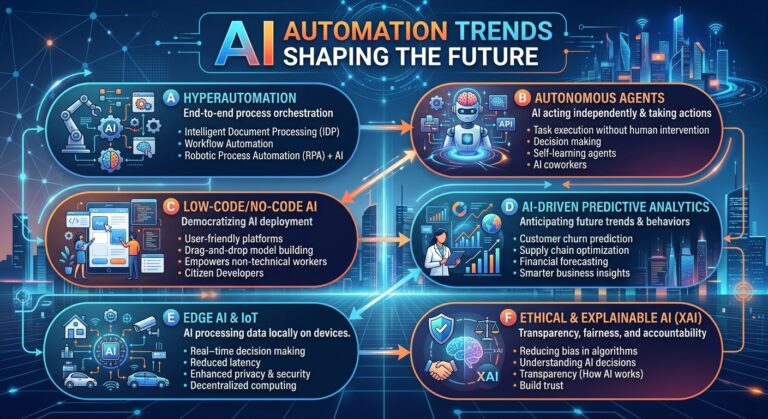
AI Automation Trends Shaping the Future
Introduction
Artificial intelligence is changing how businesses operate, communicate with customers, and manage everyday tasks. Activities that once required hours of manual work can now be supported by intelligent systems capable of processing information, generating content, analyzing data, and coordinating workflows.
As AI technology continues to develop, automation is moving beyond simple repetitive tasks. Businesses are increasingly exploring systems that can understand requests, recommend actions, connect applications, and assist with more complex processes.
These developments are creating new opportunities to improve productivity, reduce operational friction, and deliver better customer experiences.
Understanding AI automation trends is becoming important for organizations that want to remain competitive in a rapidly changing digital environment. Whether a business is a startup, a small company, or a large enterprise, emerging automation technologies can influence how work is performed and how resources are managed.
In this article, we will explore the major AI automation trends shaping the future, their potential business applications, and how organizations can prepare for the next generation of intelligent automation.
What Is AI Automation?
AI automation combines artificial intelligence with technology that performs or coordinates tasks with limited manual intervention.
Traditional automation generally follows predefined rules. For example, a system may send a confirmation email whenever a customer completes a purchase.
AI automation can introduce additional capabilities, including understanding natural language, summarizing documents, classifying requests, identifying patterns, and generating responses.
When connected to business applications and workflow rules, these capabilities can help automate more complex processes.
Examples include:
- AI-powered customer service
- Automated document processing
- Intelligent sales workflows
- AI-assisted marketing operations
- Automated business reporting
- Customer communication automation
- Predictive maintenance
- AI-assisted decision support
- Intelligent workflow coordination
The future of AI automation is not simply about completing individual tasks. It is increasingly about connecting tasks into useful, coordinated business processes.
The Rise of Autonomous AI Agents
One of the most significant trends in AI automation is the development of AI agents that can work through multistep tasks.
Unlike a basic chatbot that primarily responds to questions, an AI agent may be configured to interpret a goal, use approved tools, retrieve information, and perform specific actions within defined permissions.
For example, an AI agent supporting a sales team might help organize incoming leads, summarize customer inquiries, prepare follow-up drafts, and create reminders for sales representatives.
An operations agent might gather information from several applications and prepare a report for an employee to review.
These systems can reduce the need for employees to coordinate every small step manually.
However, autonomous agents are not universally reliable or fully independent. Their performance depends on the model, tools, available information, permissions, and safeguards surrounding their actions.
Businesses should begin with clearly defined tasks, limit access to sensitive systems, and require human approval for consequential actions.
Intelligent Workflow Automation
Workflow automation is evolving from simple trigger-and-action processes toward systems that can interpret information and assist with more flexible decisions.
For example, a traditional workflow might send every customer inquiry to the same department.
An AI-assisted workflow could analyze the message, identify the topic, summarize the customer’s needs, and recommend an appropriate destination.
This can help businesses manage processes that involve different types of information and multiple possible outcomes.
Intelligent workflow automation can support:
- Customer request classification
- Document routing
- Employee task assignment
- Information extraction
- Automated notifications
- Report preparation
- Support ticket prioritization
- Internal process coordination
The most effective approach combines AI capabilities with clear business rules. AI can interpret information, while established rules determine what actions are allowed.
AI-Powered Customer Service
Customer service is becoming an important area for AI automation.
Customers increasingly expect convenient communication, quick responses, and easy access to relevant information. Meanwhile, support teams must manage repetitive questions alongside complex cases.
AI-powered tools can help businesses respond to common inquiries, organize support tickets, summarize conversations, and assist human agents.
For example, a customer might ask a chatbot about a return policy. The system can retrieve the relevant policy and explain the next steps. If the customer has a complicated complaint, the conversation can be transferred to a human representative.
AI can also help support teams identify recurring customer problems and analyze feedback.
The trend is moving toward a hybrid customer service model in which automation handles routine work while people focus on empathy, judgment, and complex problem-solving.
For businesses exploring AI customer interaction solutions, this trend creates opportunities to improve support efficiency without sacrificing the personal attention customers value.
Hyper-Personalized Customer Experiences
AI automation is also making personalized communication easier to manage at scale.
Businesses can use relevant customer information to tailor messages, recommend useful resources, and adapt communication to a customer’s stage in the buying or service journey.
For example, a new customer may receive onboarding instructions, while an existing customer may receive information related to a service they already use.
AI can help draft personalized messages and summarize customer interactions. Automation can determine when a message should be sent based on appropriate triggers.
Potential applications include:
- Personalized onboarding
- Relevant product recommendations
- Context-aware customer support
- Tailored educational content
- Automated customer follow-ups
- Customer feedback analysis
Personalization should be helpful rather than intrusive. Businesses need to respect customer preferences, protect personal information, and avoid using data without an appropriate basis.
Generative AI in Everyday Business Operations
Generative AI can create text, summaries, images, code, and other content based on instructions and available information.
Its integration into business workflows is creating new opportunities to automate tasks that previously required substantial manual effort.
For example, generative AI can help employees:
- Draft customer emails
- Summarize meetings
- Prepare document outlines
- Create product descriptions
- Generate marketing content drafts
- Explain technical information
- Summarize reports
- Produce initial versions of internal documentation
When connected to approved business information, these tools can become part of larger workflows.
A customer support process might use AI to summarize an inquiry, draft a response, and prepare a ticket update for an agent to review.
Human review remains important because generated content can contain errors, unsupported claims, or information that does not match company policies.
The strongest applications focus on reducing drafting and administrative effort while preserving human responsibility for quality.
Predictive Analytics and Proactive Automation
Traditional business reporting often explains what has already happened.
Predictive analytics uses historical information and statistical or machine-learning methods to estimate what might happen next.
When connected to automation, predictive insights can help businesses take action earlier.
For example, an organization might use predictive models to identify possible equipment failures, estimate demand, or detect unusual patterns in transactions.
Depending on the system, an alert could then trigger an inspection request, notify a manager, or prepare a report for review.
Potential applications include:
- Inventory planning
- Demand forecasting
- Equipment maintenance
- Customer churn analysis
- Risk monitoring
- Resource allocation
- Operational planning
Predictions are estimates, not guarantees. Businesses should evaluate model accuracy and avoid automatically making high-impact decisions based solely on uncertain predictions.
AI Automation for Small Businesses
AI automation is becoming increasingly accessible to businesses that do not have large technology teams.
Cloud-based tools and user-friendly interfaces can help small businesses automate everyday tasks without building every system from scratch.
Examples include:
- Responding to frequently asked questions
- Sending appointment reminders
- Organizing leads
- Drafting customer emails
- Scheduling follow-ups
- Summarizing business reports
- Categorizing incoming requests
- Managing basic administrative workflows
For small businesses, the most useful automation is often practical rather than complicated.
A business that automates repetitive customer inquiries or appointment reminders may free up valuable employee time without needing an elaborate AI system.
Small companies should start with one measurable problem, test the solution, and expand only when the results justify the cost.
The Growth of AI-Assisted Marketing Automation
Marketing teams are increasingly exploring AI tools to streamline content production, campaign management, and performance analysis.
AI can assist with brainstorming, drafting content, organizing campaign assets, summarizing customer feedback, and preparing performance reports.
Automation can connect these activities into a more coordinated workflow.
For example, a marketing team might use a workflow to collect campaign data, generate a performance summary, and notify the team when the report is ready.
AI can also help adapt draft messages for different customer segments, subject to appropriate review and approval.
The future of marketing automation will likely involve closer connections between content, customer data, campaign execution, and measurement.
However, human creativity and strategic direction remain essential. Businesses still need to verify claims, maintain a consistent brand voice, and ensure that their content provides genuine value.
Multimodal AI Automation
AI systems are increasingly being developed to work with different types of information, including text, images, audio, and video.
This capability is known as multimodal AI.
It creates opportunities to automate tasks that involve more than written text.
For example, an AI system might help analyze a photograph submitted with a support request, transcribe a customer voice message, summarize a recorded meeting, or extract information from a document containing both text and images.
Potential applications include:
- Voice-enabled customer service
- Meeting transcription and summaries
- Visual product support
- Document analysis
- Audio content processing
- Video content review
- Accessibility assistance
These capabilities can make automation more useful in environments where information arrives through several different formats.
Businesses should evaluate accuracy carefully, particularly when images or audio contain sensitive information or influence important decisions.
Voice AI and Conversational Automation
Voice technology is becoming another area of AI automation development.
Traditional automated phone systems often rely on rigid menus and predefined commands. Newer conversational systems can be designed to interpret natural-language requests and provide more flexible responses.
Businesses may use voice AI to assist with appointment scheduling, basic customer inquiries, call routing, and information retrieval.
Voice-enabled systems can also support employees who need to access information without typing.
For example, a customer could ask about a service or request assistance through a conversational interface rather than navigating a complicated menu.
However, voice automation needs safeguards for identity verification, sensitive information, consent, and escalation to human agents.
Businesses should also provide alternatives for customers who prefer text-based communication or have accessibility needs that make voice interfaces unsuitable.
AI-Driven Cybersecurity and Risk Monitoring
As organizations automate more activities, security becomes increasingly important.
AI can help security teams analyze patterns, identify anomalies, and prioritize alerts that may indicate suspicious behavior.
For example, a monitoring system may flag unusual account activity or detect an unexpected pattern in network events.
An automated workflow could then notify a security analyst, gather relevant information, or initiate an approved containment procedure.
AI can support:
- Anomaly detection
- Fraud monitoring
- Security alert classification
- Log analysis
- Threat investigation
- Access monitoring
- Incident reporting
However, automated security decisions can also produce false alarms or miss real threats.
Businesses should use layered security controls, carefully manage system permissions, and ensure that high-impact actions follow appropriate incident-response procedures.
Low-Code and No-Code AI Automation
Another important trend is the growing availability of low-code and no-code automation platforms.
These tools allow people to build workflows through visual interfaces and configuration rather than writing every component from scratch.
Some platforms also provide AI features that help users create workflows, classify information, or generate content.
This can make automation more accessible to departments such as marketing, customer service, operations, and administration.
For example, a team could create a workflow that collects website inquiries, records customer details, sends a confirmation, and assigns a follow-up task.
Nevertheless, easy setup does not eliminate the need for technical oversight.
Businesses should review permissions, protect sensitive information, document workflows, and ensure that automations remain manageable as they grow.
Human-AI Collaboration in the Workplace
AI automation is changing how employees interact with technology.
Instead of using AI only for standalone questions, workers can increasingly incorporate it into everyday applications and processes.
An employee might use AI to summarize information, draft a response, retrieve relevant documents, or prepare a report within an existing workflow.
This approach can improve productivity without requiring every decision to be delegated to an automated system.
The most effective human-AI collaboration divides responsibilities according to strengths.
AI can assist with information processing and repetitive activities. Humans provide judgment, context, empathy, creativity, and accountability.
Organizations should also invest in employee training so that people understand the capabilities and limitations of the tools they use.
AI Automation for Business Decision Support
Managers often need to review large amounts of information before making decisions.
AI can help summarize reports, compare information, identify patterns, and prepare possible options for consideration.
For example, an AI assistant may summarize customer feedback across several departments and highlight common complaints.
A manager can use that information to investigate the underlying causes and decide which improvements to prioritize.
AI decision-support systems may be particularly useful when they reduce the effort required to gather and understand information.
However, businesses should not confuse a clear-looking AI recommendation with a proven conclusion. Important decisions should be checked against reliable data, relevant context, and professional judgment.
Greater Focus on Responsible AI Automation
As AI systems gain more responsibilities, businesses need to pay greater attention to governance and accountability.
Responsible AI automation involves more than making a workflow function correctly. It also requires understanding how information is handled, which actions the system can perform, and who is responsible for the outcome.
Important practices include:
- Protecting customer and employee data
- Limiting access to necessary systems
- Reviewing AI-generated information
- Keeping records of important automated actions
- Defining escalation procedures
- Testing for errors and unintended outcomes
- Monitoring system performance
- Informing users when appropriate
- Maintaining human oversight for consequential decisions
Businesses that build these practices into their automation strategy can better manage risks while developing customer and employee trust.
Connected AI Systems and End-to-End Automation
Many organizations already use separate tools for customer service, sales, marketing, finance, and operations.
A growing automation trend is connecting these systems so that information can move between departments with less manual coordination.
For example, when a customer purchases a service, an integrated workflow could:
- Record the transaction.
- Update the customer management system.
- Send a confirmation.
- Trigger an onboarding process.
- Notify the relevant team.
- Create a follow-up task.
- Track whether onboarding is completed.
AI can assist with interpreting customer requests, generating messages, and summarizing information at different stages.
This creates the possibility of automating entire processes instead of isolated tasks.
The challenge is ensuring that connected systems use accurate information, respect access permissions, and handle exceptions reliably.
How to Prepare for the Future of AI Automation
Businesses do not need to adopt every new AI technology to remain competitive.
A more effective approach is to identify the problems that matter most and choose automation tools that address them.
Step 1: Review Current Workflows
Identify repetitive tasks, bottlenecks, and processes that require unnecessary manual coordination.
Step 2: Set Clear Objectives
Determine whether the main goal is to save time, improve customer service, reduce errors, or increase operational visibility.
Step 3: Start With a Small Pilot
Choose one workflow that is relatively low-risk and easy to measure.
Step 4: Select Appropriate Technology
Evaluate the tool’s capabilities, integrations, reliability, cost, and security.
Step 5: Train Employees
Help employees understand how the system works, how to review its outputs, and when human intervention is necessary.
Step 6: Measure Results
Track processing time, error rates, customer satisfaction, employee workload, and overall costs.
Step 7: Expand Gradually
Extend automation to additional workflows only after the initial implementation demonstrates useful results.
This measured approach can help businesses avoid unnecessary complexity and focus their resources on improvements that deliver real value.
Challenges Businesses Should Consider
Although AI automation creates new opportunities, it also introduces practical challenges.
Data quality: AI systems may produce unreliable results when the information they receive is incomplete or incorrect.
Integration: Different applications may not connect easily, making workflows harder to maintain.
Security: Automated systems may have access to sensitive business or customer information.
Cost: Software, implementation, training, and maintenance can reduce the financial benefits if not managed carefully.
Reliability: AI-generated outputs can contain mistakes, and connected workflows may fail when a tool or integration becomes unavailable.
Employee adoption: People need training and clear procedures to use AI tools effectively.
Accountability: Businesses must determine who reviews important decisions and who is responsible when automation produces an incorrect result.
Successful AI automation depends on addressing these issues rather than assuming that new technology will solve every operational problem.
The Future of AI Automation and Business Growth
AI automation is likely to become increasingly integrated into everyday business operations.
More systems will combine information processing, content generation, workflow coordination, and controlled actions within connected applications.
Businesses may use these capabilities to streamline customer interactions, reduce repetitive administration, improve access to information, and respond more quickly to changing needs.
At the same time, effective implementation will depend on more than technological capability.
Organizations will need reliable processes, trained employees, appropriate security controls, and clear methods for evaluating results.
Companies that focus on practical applications and responsible implementation will be better positioned to benefit from future developments.
How SmileLineAI Fits Into the Future of AI Automation
Customer communication is one of the areas where AI automation can create practical value today.
AI-powered customer interaction tools can help businesses manage routine inquiries, provide useful information, support human agents, and organize communication workflows.
SmileLineAI fits into this broader business trend by focusing on AI-powered customer interactions and opportunities to improve the customer service experience.
As businesses explore intelligent automation, customer communication is a useful starting point because repetitive questions, information requests, and follow-ups can often be identified and measured.
The goal is to create a more responsive customer experience while allowing employees to concentrate on situations that require personal attention and specialized knowledge.
Conclusion
AI automation is moving beyond basic task automation toward intelligent workflows, AI agents, predictive analytics, conversational interfaces, and connected business systems.
These trends are creating opportunities to improve productivity, simplify operations, personalize customer experiences, and help employees make better use of their time.
However, successful automation is not simply about adopting the newest technology. Businesses must choose appropriate use cases, maintain reliable information, protect sensitive data, train employees, and monitor results.
The most effective strategy is to begin with a clear business problem, introduce automation carefully, and expand as measurable benefits emerge.
As AI technology continues to develop, organizations that combine intelligent automation with human judgment and responsible practices can build more efficient, adaptable, and customer-focused operations.