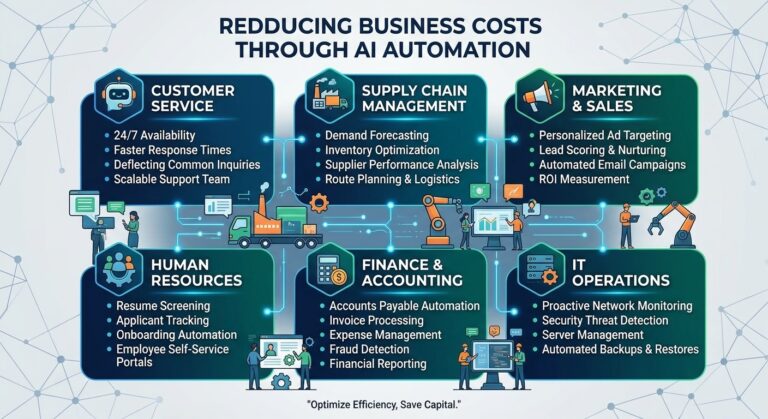
Reducing Business Costs Through AI Automation: A Practical Guide for 2026
Introduction
Every business wants to operate more efficiently, control expenses, and increase profitability. However, rising labor costs, repetitive administrative work, customer service demands, and inefficient workflows can make these goals difficult to achieve. Businesses often spend significant time and money maintaining processes that could be simplified or automated.
Artificial intelligence (AI) automation offers a practical way to address these challenges. By combining AI capabilities with automated workflows, businesses can reduce manual work, streamline operations, improve resource allocation, and make better use of their existing teams.
Reducing business costs through AI automation does not necessarily mean replacing employees or cutting essential services. In many cases, the greatest savings come from eliminating unnecessary tasks, reducing errors, speeding up routine processes, and allowing employees to focus on higher-value responsibilities.
From customer support and marketing to finance, sales, and daily administration, AI automation can help organizations identify opportunities to save money while maintaining service quality.
In this guide, we explore how AI automation reduces business expenses, which processes businesses should automate first, how to measure return on investment, and the best practices for implementing cost-saving AI solutions.
What Is AI Automation in Business?
AI automation is the use of artificial intelligence and automated processes to perform or assist with tasks that would otherwise require manual effort.
Traditional automation usually follows predefined rules. For example, a system might send an email whenever a customer completes a purchase. AI-powered automation can go further by interpreting incoming messages, categorizing requests, summarizing information, generating draft responses, or recommending the next action.
When combined with workflow automation, these capabilities can help businesses handle complex processes with fewer manual steps.
Common examples include:
- Automatically categorizing customer inquiries.
- Generating summaries of business reports.
- Drafting routine emails and follow-up messages.
- Extracting information from invoices and documents.
- Organizing sales leads according to predefined criteria.
- Preparing marketing content for human review.
- Routing requests to the appropriate department.
- Identifying recurring operational problems.
The purpose is to reduce unnecessary effort while improving speed, consistency, and accuracy.
Not every task benefits from AI. Predictable processes may be better served by simple rule-based automation, while tasks involving ambiguity or large amounts of unstructured information may benefit from AI assistance. Choosing the right approach helps prevent unnecessary technology expenses.
Reduce Labor Costs by Automating Repetitive Tasks
One of the most direct ways AI automation can reduce business costs is by decreasing the amount of employee time spent on repetitive work.
Employees frequently handle routine activities such as data entry, document processing, scheduling, record updates, and standard communications. Although these responsibilities are important, they can consume hours that employees could otherwise spend on customer relationships, problem-solving, or business development.
AI automation can handle portions of these workflows, reducing the need for repetitive manual intervention.
Examples of tasks businesses can automate
Data entry and processing: AI tools can extract information from forms, invoices, and documents, allowing employees to review structured results rather than enter every detail manually.
Email management: AI can classify messages, summarize long conversations, and prepare draft responses to common questions.
Document preparation: Businesses can use AI to generate first drafts of reports, proposals, internal summaries, and recurring business documents.
Scheduling and coordination: Automated systems can send reminders, organize requests, and coordinate routine appointments.
Record management: Connected workflows can update approved business systems when specific events occur.
For example, a small company that processes dozens of customer requests each day may spend a considerable amount of time sorting messages and forwarding them to the right employees. An AI-enabled system can categorize these requests and direct them to the appropriate team.
Employees remain responsible for reviewing unusual cases, but less time is spent on basic administration.
Cost-saving principle: Measure the employee hours saved, then determine whether those hours can be redirected toward valuable work, reduce overtime, or avoid future staffing costs as the business grows.
Time saved is not automatically cash saved. Businesses should identify how efficiency improvements translate into actual financial benefits.
Lower Customer Service Costs With AI Automation
Customer service is essential for customer satisfaction and retention, but maintaining a responsive support team can be expensive.
Businesses may need employees to answer the same questions repeatedly, manage inquiries outside regular working hours, and organize conversations across multiple channels.
AI-powered customer service tools can help reduce the workload associated with routine support requests.
How AI reduces support expenses
Automated responses: AI assistants can answer common questions using approved business information, reducing the number of routine inquiries that require human attention.
Self-service assistance: Customers can find information about services, policies, procedures, and frequently asked questions without waiting for an employee.
Intelligent routing: AI can categorize inquiries and direct them to the appropriate department, reducing delays and unnecessary transfers.
Conversation summaries: Support agents can review concise summaries of previous interactions instead of reading lengthy message histories.
Draft response generation: AI can help employees prepare accurate, consistent replies for review before sending them to customers.
Imagine an online business receiving hundreds of questions about delivery procedures, product features, and account access. If an AI assistant can reliably resolve a portion of these inquiries, support employees can dedicate more time to billing disputes, complicated technical issues, and customers who need personal assistance.
This may help businesses manage higher support volumes without increasing staffing at the same rate as demand.
Solutions such as SmileLineAI fit into this broader area of AI-powered customer communication, where businesses can explore ways to streamline customer interactions and improve operational efficiency.
However, businesses should provide clear escalation paths, protect customer information, and monitor response quality. A poorly configured chatbot can create additional costs if customers receive inaccurate answers or repeatedly need to contact human support.
Improve Marketing Efficiency and Reduce Campaign Waste
Marketing can generate growth, but inefficient campaigns can consume budgets without producing enough valuable leads or sales.
AI automation helps marketing teams streamline repetitive work, organize customer information, and improve campaign management.
Ways AI can reduce marketing costs
- Automating routine email campaigns and follow-up messages.
- Organizing leads according to relevant engagement signals.
- Generating first drafts of advertisements and marketing content.
- Summarizing campaign performance reports.
- Identifying underperforming campaigns for investigation.
- Repurposing existing content into different formats.
- Supporting audience segmentation using appropriate data.
- Scheduling approved content across marketing channels.
For example, a marketing team may manually prepare multiple versions of an email campaign and track performance in separate reports. AI-assisted workflows can help draft variations, organize campaign information, and summarize results in a consistent format.
Employees can then focus on reviewing creative quality, refining the campaign strategy, and deciding where the marketing budget should go.
AI can also help businesses identify potential inefficiencies in advertising campaigns. However, recommendations should be tested against actual conversion data instead of accepted automatically.
The goal is not simply to produce more marketing content. It is to improve the efficiency of the entire marketing process and direct spending toward activities that generate meaningful results.
Reduce Administrative and Operational Expenses
Administrative work often grows as a business expands. More customers, employees, suppliers, and projects create additional paperwork, scheduling, reporting, and coordination.
AI automation can help reduce these costs by simplifying recurring operational workflows.
For example, businesses can automate document classification, prepare meeting summaries, organize incoming requests, and generate draft internal reports.
An operations team may also use automated notifications to alert employees when an order needs attention or when a required approval is missing.
Common administrative automation opportunities
Invoice processing: AI can extract invoice details and flag missing or inconsistent information for review.
Expense management: AI tools can categorize submitted expenses and identify transactions that need additional documentation.
Internal reporting: Automated workflows can collect approved data and prepare recurring report drafts.
Employee onboarding: AI assistants can help new employees locate policies, procedures, and training materials.
Inventory monitoring: Where reliable data and suitable integrations exist, systems can flag stock levels that require attention.
Document organization: AI can classify files and help employees find relevant information more quickly.
These improvements may reduce administrative workload, prevent delays, and improve consistency.
Financial and employment-related processes require particular care. AI-generated records and recommendations should be checked before they affect payments, payroll, employee decisions, or regulatory reporting.
Reduce Errors and the Costs of Rework
Mistakes can create hidden business expenses. Incorrect records, missed deadlines, inconsistent customer responses, and incomplete documents can lead to refunds, repeated work, customer dissatisfaction, and operational delays.
AI automation can reduce some of these risks by standardizing routine workflows and identifying potential inconsistencies.
For example, an AI-assisted document processing system may flag an invoice whose total does not match its listed items. A customer service workflow may identify a message that lacks required information before it is forwarded to another department.
AI can also help employees compare documents, check formatting, and identify unusual entries that deserve review.
How error reduction creates savings
When businesses reduce preventable mistakes, they may spend less time correcting records, handling complaints, processing duplicate requests, or repeating work.
The financial value depends on the type of error and its frequency. A minor formatting issue may have little cost, while an incorrect payment or missed compliance requirement could be much more expensive.
AI should therefore be introduced where it addresses a meaningful risk or recurring source of rework.
Businesses should also track false alarms and errors introduced by the AI system itself. Automation is valuable only when the total cost of the process improves.
Optimize Sales Operations and Lead Management
Sales teams need to identify potential customers, respond to inquiries, schedule follow-ups, update customer relationship management systems, and maintain accurate records.
When these tasks are handled entirely by hand, important opportunities can be missed and sales employees may spend too much time on administration.
AI automation can help streamline the sales process.
Practical sales automation examples
Lead classification: AI can categorize incoming leads using predefined criteria and relevant information.
Follow-up reminders: Automated workflows can remind sales representatives to contact prospects at appropriate stages.
CRM updates: Connected systems can help organize notes, summarize conversations, and update approved fields.
Proposal preparation: AI can produce draft proposals based on authorized information and established templates.
Sales reporting: AI can summarize pipeline activity and highlight changes that deserve attention.
For example, a business receiving inquiries through its website may use automation to capture contact details, categorize requests, and assign them to the appropriate sales representative.
This can reduce manual data entry and help the team respond more consistently.
AI-generated lead scores should not be treated as definitive measures of customer value. Businesses should evaluate their usefulness against real sales outcomes and ensure that customer data is handled appropriately.
Reduce Software and Workflow Inefficiencies
Businesses often purchase multiple tools to manage communication, project planning, customer records, reporting, and content creation. Over time, overlapping subscriptions and disconnected systems can increase expenses.
AI automation can help organizations review how work moves between these systems and identify opportunities to simplify processes.
For example, a company might use separate tools for collecting customer inquiries, tracking sales leads, and preparing weekly reports. Integrating suitable systems may reduce duplicate data entry and the need for employees to transfer information manually.
However, adding an AI product does not automatically reduce software costs. A new subscription may increase total expenses if it duplicates existing capabilities.
Before purchasing another tool, businesses should evaluate:
- Which existing systems already provide the required functionality.
- Whether the new tool integrates with current workflows.
- How much time employees spend transferring information.
- Whether the subscription creates measurable value.
- What training, implementation, and maintenance will cost.
- Whether data access and security requirements can be met.
The most cost-effective solution is often the simplest one that reliably solves the problem.
Improve Inventory and Supply Chain Efficiency
Businesses that sell physical products face costs associated with storage, excess inventory, stock shortages, damaged goods, and inefficient purchasing.
AI-assisted analytics can help organizations interpret historical sales, supplier information, and inventory records to support better planning.
Depending on the quality of the available data, these tools may help identify demand patterns, highlight unusual inventory movements, and flag products that need closer attention.
For example, a retailer may use historical sales information to identify products that consistently sell more quickly during certain periods. Employees can use these insights to review purchasing plans and avoid unnecessary overstocking.
AI can also help summarize supplier performance or identify recurring delivery delays.
These systems should support rather than blindly control purchasing decisions. Unexpected events, seasonal changes, supplier disruptions, and unreliable data can make predictions inaccurate.
A sensible implementation starts with a specific inventory problem, measures the results, and expands only when the approach proves useful.
Lower Employee Training and Knowledge Management Costs
Training new employees requires time from managers, experienced colleagues, and administrative staff. Employees also need access to accurate procedures and business information as their responsibilities change.
AI assistants connected to approved internal resources can help employees find information and understand routine processes more quickly.
For example, a new customer service representative might ask an internal assistant how to handle a standard inquiry. The assistant can provide a draft explanation based on the company’s approved procedures, allowing the employee to review the guidance and consult a manager when necessary.
AI can also help convert existing documentation into training summaries, checklists, and draft learning materials.
Potential benefits include less time spent answering repeated questions, faster access to information, and more consistent training resources.
However, businesses must keep internal documentation current and make sure AI-generated answers reflect approved policies. Employees should know when they need to consult a manager or subject-matter expert.
Reduce the Cost of Scaling a Business
As businesses grow, operating expenses often increase. More customers create additional support requests, larger sales pipelines, more documentation, and greater administrative complexity.
AI automation can help businesses handle increased workloads without adding the same amount of manual effort to every process.
For example, an online business may automate routine customer inquiries, order notifications, and reporting as its sales volume grows. A consulting firm may use AI to organize project documentation and prepare recurring report drafts for multiple clients.
This can make growth more manageable.
Nevertheless, AI does not eliminate the need for employees, infrastructure, quality control, or management. Some business activities require personal attention regardless of scale.
The most useful approach is to identify processes that can expand efficiently, automate appropriate tasks, and maintain human oversight where quality and judgment matter most.
How to Calculate the ROI of AI Automation
To determine whether AI automation is actually reducing business costs, organizations need to compare the value created with the full cost of implementation.
Potential savings should be based on measurable changes rather than broad claims about AI productivity.
Step 1: Establish the current cost
Estimate how much the existing process costs, including employee time, software, rework, outsourcing, and other relevant expenses.
For example, calculate the monthly cost of manually handling a recurring administrative workflow.
Step 2: Estimate the value of time saved
Measure the number of hours saved after automation is introduced. Multiply those hours by an appropriate labor-cost rate to estimate the value of the time released.
This is an estimate of productive capacity, not necessarily direct cash savings. The business must determine how that capacity will be used.
Step 3: Include all automation expenses
Consider subscription fees, setup costs, integrations, training, monitoring, maintenance, and human review.
Do not ignore the time employees spend checking AI-generated results or fixing automation errors.
Step 4: Calculate net savings
Use this formula:
Net savings = Current process cost − New process cost
The new process cost should include the remaining labor, AI tools, maintenance, and oversight.
Step 5: Calculate ROI
A common ROI formula is:
ROI (%) = (Net benefit ÷ Total investment) × 100
For a simplified example, suppose a business invests $2,000 in implementing an automation workflow. Over a defined evaluation period, it records $3,000 in verified net benefits before subtracting that initial investment.
The ROI would be:
[
\text{ROI} = \frac{$3,000-$2,000}{$2,000}\times100 = 50%
]
The example assumes the $3,000 represents benefits before the initial investment and that other costs have already been accounted for. Businesses should use consistent time periods and avoid counting the same savings twice.
A Practical Roadmap for Implementing Cost-Saving AI
Businesses do not need to automate every department at once. A phased approach makes it easier to identify valuable opportunities and control implementation risk.
Phase 1: Audit business expenses
Review operating costs and identify recurring activities that consume significant employee time or create frequent errors.
Ask employees which processes feel unnecessarily complicated and where delays occur most often.
Phase 2: Prioritize high-value opportunities
Choose tasks that are repetitive, measurable, and suitable for automation.
A useful first project might be summarizing support conversations, organizing incoming leads, or preparing routine reports.
Phase 3: Select an appropriate tool
Compare solutions based on functionality, cost, security, integrations, ease of use, and expected benefits.
Avoid selecting a tool based solely on popularity or an impressive demonstration.
Phase 4: Run a controlled pilot
Test the solution on a limited workflow. Establish baseline measurements before implementation and track results during the pilot.
Ask employees to report problems and identify situations where human review is necessary.
Phase 5: Measure the results
Compare the automated process with the original process using measures such as:
- Average time required per task.
- Cost per completed transaction.
- Error and rework rates.
- Customer satisfaction.
- Employee workload.
- Automation maintenance costs.
Phase 6: Improve and expand
Adjust the workflow to address errors and inefficiencies. Expand to additional tasks only when the initial results demonstrate meaningful value.
This gradual approach helps businesses avoid large upfront investments in automation that may not deliver the expected benefits.
Common Mistakes That Increase AI Automation Costs
AI automation can create savings, but poor implementation may have the opposite effect.
Automating processes that do not need AI
Some tasks can be handled more cheaply with simple rules, templates, or existing software. Use AI when its ability to interpret information or generate useful outputs justifies the additional cost.
Ignoring implementation expenses
Subscriptions are only one part of the total cost. Integration, training, maintenance, monitoring, and quality assurance can also require significant resources.
Removing human review too early
Incorrect automated actions can lead to customer complaints, financial losses, and expensive corrections. Establish appropriate review requirements before expanding automation.
Choosing too many tools
Overlapping subscriptions create unnecessary spending and can fragment business information. Review existing capabilities before adopting new products.
Failing to train employees
Without clear guidance, employees may use tools inconsistently, expose sensitive information, or spend extra time correcting poor outputs.
Focusing only on short-term savings
A cheaper process may harm customer satisfaction or create additional risk. Evaluate long-term quality, reliability, and business outcomes alongside immediate cost reductions.
Ignoring security and privacy
Businesses must understand how their AI providers handle data, who can access the systems, and what information may be retained. Security incidents can create costs that outweigh any efficiency gains.
How to Keep AI Automation Cost-Effective Over Time
Cost reduction is not a one-time project. AI tools, business needs, and operating processes change, so organizations should regularly review their automation systems.
Useful practices include:
Review subscriptions: Remove unused tools and reassess whether each service continues to provide value.
Monitor output quality: Track errors, exceptions, and the amount of human correction required.
Update workflows: Change automated processes when business rules, products, or customer needs evolve.
Control access: Give systems and employees only the permissions needed for their responsibilities.
Track performance: Review the cost per task and the value produced by automation over time.
Gather employee feedback: Ask users whether the workflow genuinely reduces effort or creates new problems.
Reassess automation choices: If a simpler or less expensive tool can achieve the same result, consider switching.
These practices help prevent automation from becoming another source of unnecessary complexity.
Conclusion
Reducing business costs through AI automation is about making business processes more efficient, not simply spending less at any cost. By automating repetitive tasks, improving customer service, streamlining marketing, reducing administrative effort, and supporting better decisions, businesses can use their resources more effectively.
The strongest results come from focusing on specific problems, choosing appropriate tools, maintaining human oversight, and measuring actual financial outcomes.
Businesses should also remember that time saved does not automatically translate into cash saved. The value becomes meaningful when the organization uses its improved capacity to reduce avoidable expenses, serve customers more effectively, increase output, or support growth without unnecessary overhead.
Start with one measurable workflow, calculate its total cost, test a suitable automation solution, and compare the results. As the business learns what works, it can expand AI automation into other areas with greater confidence.
The real advantage of AI automation is not just doing the same work faster. It is building a business that uses its time, people, and resources more intelligently.