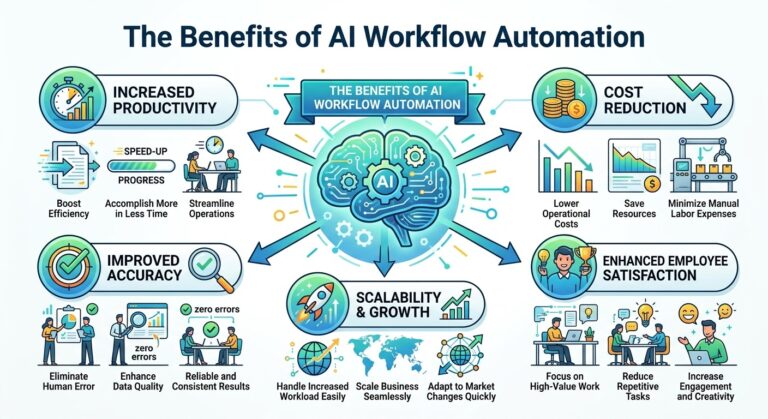
The Benefits of AI Workflow Automation
Introduction
Modern businesses must manage an increasing number of tasks, systems, and customer interactions. Employees handle emails, process information, update records, coordinate projects, respond to customer inquiries, and prepare reports. Although these activities are essential, completing every step manually can consume valuable time and slow down business operations.
This is where AI workflow automation becomes valuable.
AI workflow automation combines artificial intelligence with automated processes to help businesses complete tasks, organize information, and coordinate activities more efficiently. Instead of requiring employees to manage every step of a process, AI-powered systems can analyze incoming information, recommend actions, generate content, classify requests, and trigger the next stage of a workflow.
For example, when a customer submits an inquiry, an automated workflow can identify the request, categorize it, send an acknowledgment, create a support ticket, and notify the appropriate team. AI can assist with understanding the message and generating a relevant response, while predefined rules control important actions.
The result is a more connected approach to business operations.
In this article, we will explore the major benefits of AI workflow automation, how it works, where businesses can use it, and how organizations can implement it successfully.
What Is AI Workflow Automation?
AI workflow automation is the use of artificial intelligence and automation technology to perform or coordinate multiple steps in a business process.
Traditional automation generally follows predefined rules. For example, a system might automatically send an email whenever a customer completes a registration form.
AI workflow automation can add capabilities such as understanding natural language, summarizing information, classifying documents, identifying patterns, and generating responses.
When combined with workflow rules, integrations, and business applications, these capabilities allow organizations to automate more complex processes.
An AI-powered workflow might:
- Receive information from a customer or employee.
- Analyze the information using an AI model.
- Categorize the request or extract relevant details.
- Select an appropriate next step based on established rules.
- Update a business system.
- Notify the responsible employee.
- Record the outcome for monitoring and improvement.
Not every workflow requires AI. Simple, predictable tasks may be handled more reliably and economically with conventional automation. AI is particularly useful when a process involves unstructured information, language, or classification.
The goal is to combine the right technology with the right process.
Why AI Workflow Automation Matters for Modern Businesses
Businesses often lose time because their processes are fragmented.
An employee may need to copy information from an email into a spreadsheet, update a customer management system, notify a colleague, and send a confirmation message. When these steps happen in separate applications, work becomes slower and mistakes become more likely.
AI workflow automation helps connect these activities into a coordinated process.
Rather than treating every task as an isolated activity, businesses can create workflows in which information moves between systems and triggers appropriate actions.
This can help organizations reduce administrative work, respond more quickly, improve consistency, and make better use of their resources.
Increased Employee Productivity
One of the biggest benefits of AI workflow automation is improved employee productivity.
Employees frequently spend a significant portion of their day on repetitive activities such as sorting messages, entering data, preparing summaries, and updating records.
AI automation can reduce the time required for these tasks.
For example, a customer service employee may previously have needed to read an entire conversation, identify the customer’s issue, search for relevant information, and write a summary for another department.
An AI-assisted workflow can generate a conversation summary, identify the main issue, and prepare a draft response. The employee can then review the information and focus on resolving the customer’s problem.
This gives employees more time for activities that require human judgment, creativity, communication, and decision-making.
Improved productivity does not necessarily mean asking employees to complete more tasks. It can also mean reducing unnecessary work and allowing people to concentrate on their most valuable responsibilities.
Reduced Repetitive Manual Work
Repetitive work can slow down even well-organized businesses.
Tasks such as transferring information between systems, sorting requests, sending confirmations, and creating routine reports often follow predictable patterns.
AI workflow automation can handle many of these activities with limited manual intervention.
Examples include:
- Automatically categorizing customer inquiries
- Extracting information from invoices and forms
- Preparing email drafts
- Updating customer records
- Generating meeting summaries
- Sending appointment reminders
- Organizing support tickets
- Creating routine notifications
- Summarizing business documents
By reducing repetitive work, businesses can simplify their operations and lower the administrative burden on employees.
The best opportunities are usually tasks that happen frequently, consume noticeable amounts of time, and have clear rules for checking whether the outcome is correct.
Faster Business Processes
Slow workflows can affect customer satisfaction, employee productivity, and business growth.
When a process depends on multiple manual steps, a single delay can hold up everything that follows.
AI workflow automation can reduce these bottlenecks by processing information and initiating actions automatically.
For example, a new sales inquiry might trigger a workflow that records the lead, classifies the request, sends a confirmation, and notifies a sales representative.
Instead of waiting for someone to manually perform each step, the workflow can begin immediately.
Faster processes are particularly valuable for customer service, sales, order management, appointment scheduling, and internal approvals.
However, the actual time saved depends on the complexity of the workflow, the quality of integrations, and the number of steps that can safely be automated.
Improved Customer Service
Customer service teams often handle high volumes of similar questions and requests.
AI workflow automation can help organize these interactions and reduce the time needed to respond.
For example, when a customer submits a support request, an AI-powered workflow can identify the topic, retrieve relevant information, categorize the ticket, and route it to the appropriate department.
A chatbot may also answer routine questions about business hours, product features, or account procedures.
More complex situations can be escalated to human agents.
This combination helps businesses provide faster support without requiring employees to manually handle every routine interaction.
AI workflow automation can also assist with follow-up messages, ticket status updates, customer feedback requests, and conversation summaries.
The result can be a more organized customer service process and a smoother experience for customers.
Lower Operational Costs
Operational costs can increase when employees spend too much time on repetitive work or when processes require unnecessary manual coordination.
AI workflow automation can help reduce these costs by improving efficiency.
Potential savings may come from:
- Reduced administrative effort
- Less duplicate data entry
- Faster document processing
- Fewer repetitive support interactions
- More efficient use of employee time
- Reduced manual coordination
- Better resource allocation
For example, automating routine appointment reminders may reduce the amount of time employees spend contacting customers individually.
Automating data extraction can also reduce the effort required to process standard documents.
However, AI automation has its own costs, including software subscriptions, implementation, integration, training, and ongoing monitoring. Businesses should compare these costs with the measurable benefits rather than assuming every automated process will save money.
Greater Accuracy and Consistency
Manual processes can produce inconsistent results, especially when employees follow different procedures or work under time pressure.
AI workflow automation can improve consistency by standardizing routine steps and applying predefined rules.
For example, a workflow can require specific fields to be completed before a record is submitted. It can also validate information, flag missing details, and send exceptions for review.
AI can assist by extracting information from documents or classifying customer requests according to established categories.
Nevertheless, AI can misunderstand information or generate incorrect outputs. Consistency alone does not guarantee accuracy.
Businesses should establish validation rules, quality checks, and human review for important decisions.
Better Data Management
Businesses rely on accurate information to serve customers, manage operations, and make decisions.
However, information is often spread across emails, spreadsheets, documents, customer databases, and separate applications.
AI workflow automation can help collect, organize, classify, and transfer information between these systems.
For example, when a customer submits a contact form, a workflow can extract the relevant details, create a customer record, categorize the inquiry, and assign a follow-up task.
This reduces the need for employees to enter the same information repeatedly.
Better data management can also help employees find information more quickly and maintain more complete records.
Businesses should ensure that integrations follow appropriate access controls and that automated systems do not overwrite important information without suitable safeguards.
More Efficient Sales and Lead Management
Sales teams must manage incoming inquiries, update customer records, schedule meetings, and follow up with potential buyers.
These activities are necessary but can consume considerable time.
AI workflow automation can support several stages of the sales process.
For example, a new inquiry may trigger a workflow that:
- Captures the customer’s contact details.
- Categorizes the inquiry by product or service.
- Summarizes the customer’s stated needs.
- Assigns the lead to a suitable representative.
- Sends an acknowledgment.
- Creates a follow-up reminder.
AI can also help summarize previous conversations and prepare personalized message drafts.
These capabilities allow sales representatives to spend more time understanding customer needs and building relationships.
Businesses should ensure that automated follow-ups respect customer consent, communication preferences, and applicable marketing regulations.
Smarter Marketing Operations
Marketing teams manage multiple activities, including content planning, campaign coordination, audience segmentation, performance reporting, and customer communication.
AI workflow automation can simplify many of these processes.
For example, an automated content workflow may collect topic ideas, organize them by campaign, generate draft outlines, and notify an editor when a draft is ready for review.
A marketing reporting workflow may gather performance data from connected systems and produce a summary for the team.
AI can also help generate content variations, summarize campaign feedback, and identify patterns in customer interactions.
Human marketers remain essential for strategy, brand voice, creative direction, fact-checking, and final approval.
The strongest marketing workflows use automation to reduce repetitive coordination while preserving human control over the quality and purpose of each campaign.
Improved Collaboration Between Teams
Business processes frequently involve several departments.
A sales team may need information from customer support. The finance department may need details from sales. Operations may need to coordinate with both.
When information is transferred manually, important updates can be delayed or overlooked.
AI workflow automation can help connect these activities.
For example, when a customer signs a service agreement, a workflow can notify the relevant department, create an onboarding task, and organize the information required to begin service delivery.
Employees can receive the information they need without repeatedly asking colleagues for updates.
This can improve coordination, clarify responsibilities, and reduce unnecessary communication.
Automation should complement clear procedures rather than replace them. Every workflow still needs defined ownership and a process for handling exceptions.
Easier Business Scaling
As a business grows, its workload often increases.
More customers create more inquiries, transactions, documents, support tickets, and administrative tasks.
Without efficient processes, businesses may struggle to maintain service quality as demand increases.
AI workflow automation can help organizations handle higher volumes of routine work without increasing manual effort at the same rate.
For example, an automated support workflow can categorize incoming tickets and route them to the right team. A connected onboarding workflow can organize customer information and trigger the next steps whenever a new customer signs up.
This makes it easier to repeat successful processes consistently.
Automation does not eliminate every scaling challenge. Businesses may still need additional staff, infrastructure, or specialized expertise. However, it can reduce the operational friction that often accompanies growth.
Faster Access to Business Insights
AI workflow automation can help businesses transform raw information into more useful summaries.
Organizations may collect information from sales records, customer conversations, support tickets, project updates, and operational systems.
AI can assist with summarizing these records, identifying recurring themes, and preparing reports for human review.
For example, a customer service workflow might generate a weekly summary of common complaints and frequently requested features.
Managers can use these insights to investigate recurring problems and determine where improvements are needed.
AI-generated insights should be checked against reliable data, especially when they inform financial, operational, or strategic decisions.
Improved Customer Personalization
Customers appreciate communication that reflects their needs rather than generic messages that are irrelevant to their situation.
AI workflow automation can help businesses personalize interactions by using relevant information from previous customer activity.
For example, a workflow may send onboarding instructions that match the service a customer selected. A support system may retrieve previous conversations so an employee does not have to ask the customer to repeat information.
AI can also help draft responses that address the customer’s specific question.
Effective personalization depends on accurate data, appropriate permissions, and thoughtful communication. Businesses should avoid using sensitive information unnecessarily or making unsupported assumptions about customer preferences.
More Consistent Business Workflows
When employees perform the same process in different ways, results can vary.
One employee may remember to send a follow-up message, while another may forget. A document may be saved in the wrong location, or a request may not reach the correct department.
AI workflow automation can standardize routine activities.
For example, a workflow may require every new support ticket to receive a category, an assigned owner, and a status before processing continues.
Another workflow may ensure that a customer receives a confirmation after completing a transaction.
Standardization helps businesses establish repeatable processes and identify where errors or delays occur.
More Time for Innovation and Strategic Work
Perhaps the most valuable benefit of AI workflow automation is the time it gives employees to focus on work that creates greater value.
When people spend less time managing routine processes, they can invest more effort in:
- Developing new products
- Improving customer relationships
- Solving complex problems
- Planning business growth
- Improving internal processes
- Conducting research
- Creating new ideas
- Making informed decisions
Automation can support a workplace where employees spend less time coordinating repetitive activities and more time applying their experience and expertise.
The goal is not simply to make every employee busier. It is to make better use of the organization’s time and skills.
Practical Examples of AI Workflow Automation
Businesses can apply AI workflow automation to many everyday situations.
Business Area | Example Workflow | Potential Benefit |
Customer service | Classify tickets and route them to the correct team | Faster request handling |
Sales | Capture leads and schedule follow-ups | Fewer missed opportunities |
Marketing | Organize content drafts and review tasks | Better campaign coordination |
Human resources | Organize applications and schedule interviews | Less administrative work |
Finance | Extract invoice details for verification | Faster document processing |
Operations | Send task notifications when conditions are met | Better process coordination |
Management | Summarize recurring reports | Faster access to information |
These are examples of possible workflows rather than guaranteed results. The benefits depend on the quality of the implementation and the suitability of each process for automation.
How to Implement AI Workflow Automation Successfully
Businesses should approach AI workflow automation as a process improvement initiative rather than simply a technology purchase.
Step 1: Identify Time-Consuming Processes
Review everyday activities and identify tasks that involve repetitive steps, unnecessary handoffs, or frequent delays.
Ask employees which processes consume the most time.
Step 2: Map the Existing Workflow
Document how information enters the process, what actions employees perform, which systems are involved, and how the task is completed.
This helps reveal bottlenecks and unnecessary steps.
Step 3: Choose the Right Automation Opportunity
Prioritize workflows that are frequent, measurable, and relatively low-risk.
A simple workflow that consistently saves time can provide a better starting point than a complicated process involving many sensitive decisions.
Step 4: Select Suitable Tools
Choose AI and automation tools that support the required tasks and integrate with existing business systems.
Consider functionality, cost, reliability, security, scalability, and ease of use.
Step 5: Establish Rules and Human Review
Determine which steps can run automatically and which require employee approval.
For example, AI may extract invoice information, but an employee may need to approve the details before payment is processed.
Step 6: Test Before Expanding
Run the workflow with realistic examples. Check for inaccurate outputs, duplicate actions, missing information, and failed integrations.
Step 7: Measure Performance
Track metrics such as processing time, error rates, employee workload, customer satisfaction, and total operating costs.
Step 8: Improve Continuously
Review results and refine the workflow as business needs change.
Automation should remain accountable, maintainable, and aligned with the organization’s objectives.
Common Challenges of AI Workflow Automation
Despite its advantages, AI workflow automation can introduce challenges that businesses need to manage.
Integration Difficulties
Older systems or incompatible applications may make it difficult to transfer information between tools.
Inaccurate AI Outputs
AI can misinterpret messages, extract incorrect details, or produce unreliable summaries.
Data Security and Privacy
Automated workflows may handle customer or employee information. Businesses need appropriate access controls, security measures, and data-handling policies.
Employee Training
Employees need to understand how workflows operate, when to trust automated assistance, and when to intervene.
Over-Automation
Automating a poorly designed process can make existing problems occur faster. Businesses should improve workflows before automating them whenever possible.
Ongoing Maintenance
Software changes, new business requirements, and updated policies can affect automated workflows. Regular monitoring is necessary to keep them reliable.
Addressing these challenges early can help businesses gain the benefits of automation while reducing unnecessary risks.
The Future of AI Workflow Automation
AI workflow automation is evolving from isolated task automation toward connected systems that coordinate multiple activities.
Future workflows may increasingly combine language understanding, information retrieval, data analysis, and controlled actions across business applications.
For example, when a customer reports a product problem, an AI-assisted workflow could summarize the complaint, retrieve relevant support documentation, create a ticket, assign it to the correct team, and prepare a draft response.
An employee could then review the proposed action or approve the next step when necessary.
More advanced systems may also help businesses monitor processes, identify recurring bottlenecks, and suggest improvements.
However, greater automation will make governance and oversight even more important. Businesses will need clear permissions, reliable records, defined escalation procedures, and human accountability for consequential decisions.
The organizations most likely to benefit are those that combine useful technology with well-designed processes and trained employees.
How SmileLineAI Fits Into Smarter Business Automation
Customer communication is one area where AI workflow automation can make a practical difference.
Businesses can use AI-powered customer interaction solutions to help answer routine questions, organize inquiries, support human agents, and create more efficient communication workflows.
SmileLineAI fits into this broader approach by focusing on AI-powered customer interactions and helping businesses explore ways to improve communication and customer service.
When customer communication workflows are designed carefully, businesses can reduce repetitive work while making it easier for customers to obtain information and receive support.
The key is to use automation where it provides clear value and preserve human involvement wherever judgment, empathy, or specialized expertise is needed.
Conclusion
AI workflow automation offers businesses an opportunity to improve productivity, reduce repetitive work, accelerate operations, and deliver more consistent customer experiences.
From customer service and sales to marketing, finance, administration, and internal collaboration, AI-powered workflows can help organizations coordinate tasks and use information more effectively.
The benefits are not limited to completing work faster. Automation can also give employees more time for strategic thinking, creative problem-solving, and meaningful customer relationships.
To achieve these benefits, businesses should begin with clear objectives, choose appropriate tools, protect sensitive information, maintain human oversight, and measure the results.
AI workflow automation is not a replacement for good business processes. It is a way to make those processes more efficient, connected, and scalable.
Businesses that implement it thoughtfully can build a stronger foundation for sustainable growth and a more productive future.