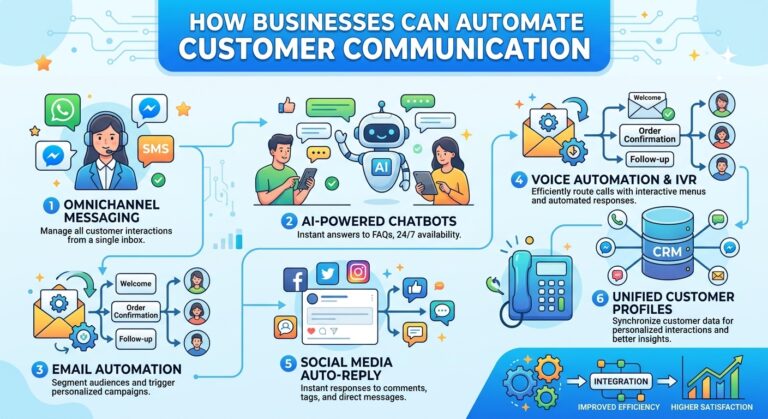
How Businesses Can Automate Customer Communication
Introduction
Customer communication is one of the most important parts of running a successful business. Customers expect quick answers, helpful information, timely updates, and consistent support whenever they interact with a company. However, managing every conversation manually can become challenging as a business grows.
Employees may spend hours responding to emails, answering frequently asked questions, sending appointment reminders, following up with leads, and providing order updates. Although these activities are necessary, handling every interaction manually can slow down operations and reduce the time available for more important work.
This is why more businesses are exploring ways to automate customer communication.
With the help of artificial intelligence (AI), chatbots, automated messaging systems, and workflow automation tools, businesses can streamline routine conversations while maintaining meaningful relationships with their customers.
Customer communication automation helps companies deliver information at the right time, respond more efficiently, and reduce repetitive workloads. When implemented correctly, it allows employees to focus on complex customer needs while technology handles routine communication.
In this guide, we will explore how businesses can automate customer communication, the tools and strategies they can use, and the benefits of creating a more efficient communication process.
What Is Customer Communication Automation?
Customer communication automation is the use of software and technology to manage routine interactions with customers without requiring employees to manually perform every step.
These systems can send messages, answer common questions, provide updates, collect information, and trigger follow-up actions based on customer behavior or predefined conditions.
For example, when a customer submits a contact form, an automated system can immediately send a confirmation message. It can then notify the appropriate team, organize the customer’s information, and schedule a follow-up reminder.
AI-powered systems can take automation further by interpreting customer questions, generating relevant responses, and helping determine what action should happen next.
Common examples of customer communication automation include:
- Automated email responses
- AI-powered customer service chatbots
- Appointment confirmations and reminders
- Order and delivery notifications
- Automated lead follow-ups
- Customer onboarding messages
- Frequently asked question responses
- Customer feedback requests
- Support ticket updates
- Personalized customer notifications
The objective is to make communication faster, more consistent, and easier to manage as the business grows.
Why Businesses Should Automate Customer Communication
Customers increasingly expect businesses to provide convenient and responsive service. Delayed replies, missed follow-ups, and inconsistent information can create frustration and reduce trust.
Manual communication also becomes harder to manage when the number of customers increases.
Automation helps businesses address these challenges by making routine communication more organized and predictable.
Faster Customer Responses
Automated systems can respond to common inquiries immediately instead of requiring customers to wait for an employee.
For example, a chatbot can explain business hours, provide basic product information, or direct customers to relevant resources at any time.
Reduced Employee Workload
Customer service teams often answer the same questions repeatedly. Automation can handle many of these interactions, allowing employees to concentrate on complicated requests.
More Consistent Messaging
Automated communication can use approved templates and current business information to provide consistent messages across different customer interactions.
Better Customer Engagement
Timely messages help businesses stay connected with customers throughout their journey, from the first inquiry to post-purchase support.
Improved Operational Efficiency
By reducing manual communication tasks, businesses can streamline workflows, improve coordination, and make better use of employee time.
Automate Customer Communication With AI Chatbots
AI chatbots are among the most useful tools for automating customer communication.
They can be integrated into websites and digital communication channels to answer questions, guide visitors, collect information, and assist customers with routine requests.
For example, a customer visiting an online business may want to know which service is appropriate for their needs.
Instead of waiting for an employee, the customer can ask the chatbot a question and receive an immediate response based on the information available to the system.
AI chatbots can assist with:
- Answering frequently asked questions
- Explaining products and services
- Providing basic troubleshooting instructions
- Collecting customer details
- Directing inquiries to the right department
- Helping visitors find relevant information
- Transferring complex issues to human agents
Unlike simple rule-based chatbots, AI-powered systems can interpret a wider range of natural-language questions. Their actual capabilities depend on the model, knowledge sources, integrations, and configuration.
Businesses should ensure that chatbots provide accurate information and offer a clear path to human assistance when necessary.
Use Automated Email Communication
Email remains an important channel for customer communication, particularly for businesses that need to send confirmations, updates, onboarding instructions, and follow-up messages.
Automated email systems allow businesses to create workflows that send messages when specific events occur.
For example, when someone signs up for a service, the system can automatically send a welcome email with instructions for getting started.
A typical email automation sequence might include:
- A welcome message after registration.
- Helpful information about using the service.
- A follow-up email offering additional guidance.
- A reminder about an unfinished setup process.
- A request for feedback after the customer has had time to use the service.
Businesses can also use AI to draft email responses, summarize incoming messages, and help agents personalize communications.
However, automated emails should remain relevant to the recipient. Businesses should respect consent requirements, privacy rules, unsubscribe preferences, and applicable communication regulations.
Automate Appointment Confirmations and Reminders
Businesses that rely on appointments often spend considerable time confirming bookings and reminding customers about upcoming visits.
These tasks can be automated through scheduling systems and messaging workflows.
For example, when a customer books an appointment, an automated system can send a confirmation containing the date, time, location, and any preparation instructions.
The system can also send a reminder before the appointment and provide instructions for rescheduling.
This approach is useful for:
- Professional service providers
- Consultants
- Educational institutions
- Salons and wellness businesses
- Repair and maintenance services
- Clinics and other appointment-based organizations
Automation helps customers stay informed while reducing the amount of manual coordination required from employees.
Send Automated Order and Delivery Updates
Customers frequently contact businesses to ask about order status, shipping, and delivery estimates.
These questions can create a large volume of repetitive support requests.
Businesses can automate order-related communication by connecting their messaging systems with order management or delivery platforms.
For example, an automated workflow can send a message when:
- An order is received
- A payment is confirmed
- An order is shipped
- A delivery status changes
- A package is delivered
- An order requires additional attention
Providing timely updates can reduce uncertainty and help customers understand what is happening with their purchases.
It is important to connect these messages to reliable order information so customers do not receive incorrect or outdated updates.
Automate Sales Follow-Ups
Following up with potential customers is essential for many businesses, but manual follow-ups are easy to forget when sales teams manage large numbers of leads.
Customer communication automation can help ensure that inquiries receive timely attention.
For example, when a visitor requests a product demonstration, a business can automatically send a confirmation email and notify a sales representative.
If the prospect does not respond, the system can schedule an appropriate follow-up according to the company’s communication policy.
Automated sales communication can help businesses:
- Acknowledge new inquiries
- Schedule follow-up reminders
- Share relevant product information
- Organize lead records
- Notify sales representatives
- Coordinate appointment scheduling
- Track communication history
AI can also help classify inquiries according to customer needs or buying intent. These classifications should be treated as decision-support signals rather than unquestionable conclusions.
The best approach combines timely automation with personalized conversations led by sales professionals.
Personalize Automated Customer Messages
Automation does not have to make customer communication feel impersonal.
When businesses use relevant customer information responsibly, they can create messages that reflect individual needs and interactions.
For example, a customer who recently purchased a product may receive instructions for using it. Someone who requested information about a particular service may receive a relevant explanation rather than a generic message.
Personalization can involve:
- Using the customer’s preferred name
- Referencing a recent transaction
- Providing relevant product information
- Sending reminders based on customer actions
- Sharing useful onboarding resources
- Offering support related to a recent inquiry
AI can help generate or adapt message drafts, while automation rules determine when those messages should be sent.
Businesses should avoid collecting unnecessary personal information and should ensure that personalization respects customer preferences and privacy expectations.
Automate Customer Support Ticket Updates
Customer support conversations sometimes take hours or days to resolve. During that period, customers may need updates about the progress of their requests.
Automated ticket communication can provide these updates without requiring employees to write every message manually.
For example, a support system can notify a customer when a ticket is received, assigned, updated, or resolved.
It can also send a message when additional information is required.
AI can assist by summarizing the conversation and drafting a status update based on the latest ticket information.
These systems should only communicate verified information. If a case is delayed or requires a special explanation, a human agent may need to intervene.
Use AI to Understand Customer Messages
Customer communication is not just about sending messages. Businesses must also understand what customers are asking for.
AI can help analyze incoming messages and identify their likely purpose.
For example, a system may classify a message as a billing question, technical issue, product inquiry, complaint, or sales request.
This information can help the business determine the next action.
A customer with a simple question may receive an automated answer, while a customer reporting a complex technical problem may be directed to a specialist.
AI can also summarize long conversations so employees can understand the main issue without reviewing every message.
These capabilities can improve communication workflows, particularly when businesses receive high volumes of customer inquiries.
Connect Communication Channels With Workflow Automation
Businesses often communicate with customers through multiple channels, including email, website chat, messaging applications, and telephone support.
When these channels operate separately, employees may need to copy information between systems or repeatedly ask customers for details.
Workflow automation can connect communication tools with customer relationship management systems, help desks, scheduling platforms, and other business applications.
For example, a customer who submits a website inquiry could trigger a workflow that:
- Records the inquiry in the customer management system.
- Sends an acknowledgment message.
- Categorizes the request.
- Assigns it to the appropriate team.
- Creates a follow-up task.
- Tracks the status until the request is resolved.
This creates a more organized communication process and reduces the risk of missed requests.
Before connecting systems, businesses should confirm that the integrations are reliable and that customer data is shared only with authorized services.
Automate Customer Feedback Collection
Customer feedback helps businesses understand what is working and where improvements are needed.
However, manually requesting feedback from every customer can be time-consuming.
Automated workflows can send feedback requests after a purchase, appointment, delivery, or completed support interaction.
For example, after resolving a support ticket, a business could send a short survey asking whether the customer’s problem was resolved.
AI can then help summarize feedback and identify recurring themes, such as slow responses, confusing instructions, or product issues.
Businesses can use these insights to improve customer communication and service quality.
Feedback messages should be appropriately timed and easy for customers to ignore or decline where applicable.
Choose the Right Customer Communication Automation Tools
Selecting the right tools depends on the size of the business, the volume of customer interactions, and the types of communication that need to be automated.
Businesses should evaluate tools according to their actual needs rather than choosing technology based only on the number of features it offers.
Important capabilities to consider include:
AI chatbots: Useful for answering routine questions and guiding website visitors.
Email automation platforms: Suitable for welcome messages, follow-ups, confirmations, and customer education.
Customer relationship management systems: Help organize customer details, communication history, and sales activities.
Help desk automation: Supports ticket classification, routing, notifications, and agent workflows.
Scheduling software: Automates appointment confirmations, reminders, and rescheduling.
Workflow automation platforms: Connect multiple applications and trigger actions when specific events occur.
AI writing assistants: Help employees draft, summarize, and personalize customer messages.
An effective system may combine several tools, but businesses should avoid creating unnecessary complexity. Whenever possible, choose compatible tools that can share information securely.
Measure the Success of Customer Communication Automation
Automation should improve measurable business outcomes, not simply increase the number of messages being sent.
Businesses can evaluate their communication workflows using several key performance indicators.
Metric | What It Measures |
First response time | How quickly customers receive an initial response |
Resolution time | How long it takes to resolve customer issues |
Customer satisfaction | How customers rate their support experience |
Automation resolution rate | The proportion of eligible requests resolved without human intervention |
Escalation rate | How frequently automated conversations are transferred to employees |
Follow-up completion | Whether required follow-ups happen on time |
Cost per interaction | The resources required to handle a customer interaction |
These metrics should be considered together. A chatbot that responds quickly but provides incorrect answers may reduce response time while damaging customer satisfaction.
Businesses should review performance regularly and adjust their workflows when results fall short of expectations.
Common Mistakes to Avoid When Automating Customer Communication
Although automation offers many advantages, poor implementation can create frustrating customer experiences.
Automating Every Conversation
Some customers need personal assistance, especially when dealing with complaints, sensitive situations, or complicated problems.
Businesses should make human support accessible.
Sending Too Many Messages
Excessive notifications and follow-ups can annoy customers. Every automated message should serve a clear purpose.
Using Outdated Information
Automated responses based on incorrect pricing, old policies, or outdated product details can damage customer trust.
Ignoring Customer Privacy
Customer data should be handled securely, with appropriate permissions, access controls, and retention practices.
Making Automation Difficult to Escape
Customers should not be forced to repeat themselves endlessly to an automated system. Clear escalation options are essential.
Failing to Test Workflows
A poorly configured workflow may send duplicate messages, notify the wrong team, or trigger communication at the wrong time.
Testing and ongoing monitoring can help prevent these problems.
A Step-by-Step Plan for Automating Customer Communication
Businesses can introduce automation gradually instead of attempting to redesign every communication process at once.
Step 1: Review Existing Communication
Identify the channels customers use and the most common questions employees answer.
Step 2: Identify Repetitive Tasks
Look for routine activities such as sending confirmations, answering FAQs, assigning tickets, and following up with leads.
Step 3: Choose One High-Value Workflow
Start with a task that consumes significant time but has a low risk of causing harm if automated correctly.
Step 4: Select Suitable Tools
Choose software that supports the workflow and integrates with existing business systems.
Step 5: Create Accurate Message Templates
Develop clear, helpful messages based on approved company information.
Step 6: Test With Realistic Scenarios
Check how the system behaves when information is missing, a customer asks an unusual question, or an action fails.
Step 7: Provide Human Escalation
Make sure customers can reach an employee when automation cannot resolve their problem.
Step 8: Monitor and Improve
Measure response times, resolution quality, customer feedback, and workload reduction. Use these results to refine the system.
The Future of Automated Customer Communication
AI is moving customer communication beyond simple scheduled messages and basic chatbot responses.
As technology develops, businesses will increasingly be able to connect customer conversations with actions across their operations.
For example, an AI assistant may help understand a customer’s request, retrieve relevant account information, draft an answer, update a support ticket, and schedule a follow-up within one connected workflow.
More advanced systems may also help businesses recognize recurring customer problems and identify opportunities to improve their products or services.
However, effective automation will continue to depend on reliable information, thoughtful workflow design, privacy protection, and human oversight.
Businesses that focus on these fundamentals will be better positioned to use AI to improve communication without sacrificing trust.
How SmileLineAI Can Support Smarter Customer Communication
AI-powered customer communication solutions can help businesses manage routine conversations more efficiently while making it easier for customers to find information and receive assistance.
For businesses exploring AI customer interaction tools, SmileLineAI can be part of a broader strategy to improve digital communication, streamline support workflows, and reduce repetitive work.
The most effective approach is to identify the communication challenges customers experience most frequently and introduce automation where it provides clear value.
By combining automated assistance with accessible human support, businesses can build a more responsive and consistent customer communication experience.
Conclusion
Customer communication automation helps businesses respond faster, reduce repetitive work, and maintain more consistent interactions with their customers.
From AI chatbots and automated emails to appointment reminders, sales follow-ups, support ticket updates, and customer feedback collection, businesses have many opportunities to simplify their communication workflows.
The key is to automate routine tasks without losing the personal attention that customers value.
Businesses should start with clear goals, select appropriate tools, protect customer information, and measure the results of every automated workflow.
When implemented thoughtfully, customer communication automation can improve operational efficiency, support customer satisfaction, and help businesses scale without making every interaction dependent on manual effort.
Ultimately, successful automation is not about sending more messages. It is about delivering the right information, to the right customer, at the right time.