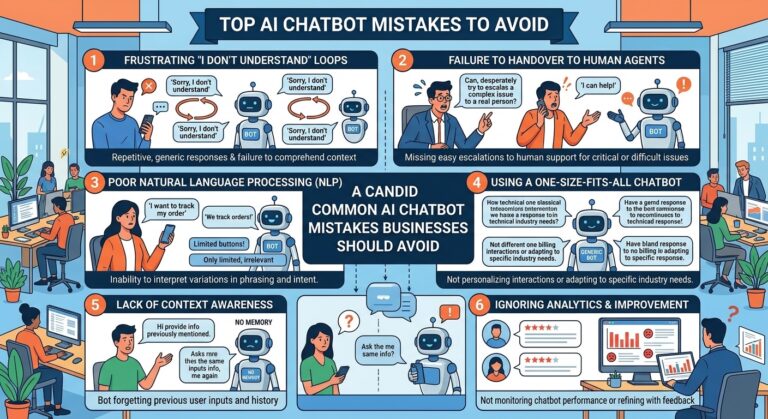
Common AI Chatbot Mistakes Businesses Should Avoid
Introduction
AI chatbots have become an important part of modern customer service, sales, marketing, and business communication. They can answer questions, provide instant support, qualify leads, guide customers through products and services, and handle repetitive tasks around the clock.
However, simply adding an AI chatbot to a website does not guarantee better customer experiences or business results. Poor planning, unclear objectives, inadequate training, and weak customer experience design can turn a potentially useful chatbot into a source of frustration.
Businesses need to understand both what AI chatbots can do and where they can fail. A successful chatbot strategy requires more than choosing an AI platform. It involves defining clear goals, providing accurate information, designing useful conversations, protecting customer data, monitoring performance, and knowing when a human should take over.
This guide explores the most common AI chatbot mistakes businesses should avoid and explains how companies can build more useful, reliable, and customer-friendly chatbot experiences.
Launching a Chatbot Without Clear Goals
One of the biggest mistakes businesses make is implementing a chatbot simply because AI is popular.
A chatbot should have a specific business purpose. Without clear goals, it can become difficult to determine whether the chatbot is actually helping customers or improving business operations.
Before launching an AI chatbot, businesses should determine what they want it to accomplish.
Possible goals include:
- Answering frequently asked questions
- Providing customer support
- Generating leads
- Qualifying prospects
- Scheduling appointments
- Helping customers find products
- Providing order information
- Collecting customer feedback
- Reducing repetitive support requests
- Connecting customers with human agents
Clear objectives make it easier to design the chatbot and measure its performance.
Trying to Make the Chatbot Do Everything
Another common mistake is expecting one chatbot to handle every possible customer interaction.
A chatbot may be capable of performing many tasks, but attempting to make it responsible for everything can create complicated conversations and inconsistent experiences.
Businesses should start with specific use cases where automation can provide meaningful value.
For example, a company could initially use its chatbot to answer common support questions and qualify sales leads. After analyzing performance, additional capabilities can be introduced.
A focused chatbot is often easier to manage, improve, and monitor than one overloaded with responsibilities.
Providing Outdated or Inaccurate Information
AI chatbots are only as useful as the information available to them.
If a chatbot provides outdated pricing, incorrect product details, old business hours, or inaccurate policies, customers may lose confidence in the company.
Businesses should regularly review the information used by their chatbot.
Important information to maintain includes:
- Product descriptions
- Pricing
- Business hours
- Return policies
- Shipping information
- Service availability
- Contact details
- Frequently asked questions
- Current promotions
Regular content updates help prevent the chatbot from becoming a source of misinformation.
Failing to Train the Chatbot Properly
An AI chatbot needs appropriate information and instructions to perform effectively.
Businesses sometimes launch chatbots without giving sufficient attention to training, knowledge sources, conversation flows, and expected customer questions.
Before deployment, companies should identify the questions customers commonly ask and ensure the chatbot can handle them accurately.
It is also important to test different ways customers might phrase the same question.
For example, customers may ask:
- “How much does this cost?”
- “What is the price?”
- “How much do I have to pay?”
- “What are your rates?”
A well-designed chatbot should understand that these questions may have the same underlying intent.
Creating Conversations That Feel Too Robotic
Customers generally want efficient answers, but they also expect communication to feel natural.
A chatbot that responds with overly formal, repetitive, or unnatural language can make interactions feel impersonal.
Businesses should design conversational responses that are:
- Clear
- Friendly
- Concise
- Helpful
- Relevant
- Easy to understand
The goal is not necessarily to make a chatbot pretend to be human. Instead, the goal should be to make interactions comfortable and useful.
A simple, natural response is often more effective than a long and complicated answer.
Making Conversations Too Complicated
Long chatbot conversations can frustrate customers when a simple question could have been answered immediately.
For example, asking customers to complete numerous steps before providing basic information can create unnecessary friction.
Businesses should reduce unnecessary questions and collect only information that is genuinely needed.
A good chatbot conversation should move customers toward their goal rather than forcing them through unnecessary steps.
Not Providing a Human Handoff
One of the most important chatbot mistakes is failing to provide an easy way to reach a human agent.
AI chatbots are useful for many routine interactions, but some situations require human judgment, empathy, expertise, or authorization.
Customers should have a clear path to human support when:
- The chatbot does not understand the request
- The customer is dealing with a complex problem
- A complaint requires personal attention
- Sensitive information is involved
- A transaction needs human approval
- The customer specifically requests an agent
A smooth transition from AI to human support can significantly improve the overall customer experience.
Hiding the Fact That Customers Are Talking to AI
Businesses should avoid intentionally misleading customers about whether they are interacting with an AI system.
Clear communication can help establish appropriate expectations.
For example, a chatbot can introduce itself as an AI assistant and explain what it can help with. Customers then understand the nature of the interaction and can decide when they need additional assistance.
Transparency is especially important when conversations involve important business decisions, sensitive information, or customer accounts.
Ignoring Customer Data Privacy
AI chatbot conversations may contain valuable customer information.
Depending on the chatbot and business use case, conversations can include names, contact details, order information, preferences, account information, or other sensitive data.
Businesses should therefore take data protection seriously.
Organizations should understand:
- What information the chatbot collects
- Why the information is collected
- Where information is stored
- Who can access it
- How long it is retained
- How customers can request information about their data
Privacy practices should align with applicable laws, regulations, and company policies.
Asking for Too Much Personal Information
Another common mistake is collecting information that is unnecessary for the customer’s request.
If someone wants to know a business’s opening hours, they probably do not need to provide extensive personal details.
Businesses should follow a data-minimization approach: collect information when there is a legitimate reason to do so and avoid unnecessary requests.
This can make the experience simpler while reducing privacy and security risks.
Not Testing the Chatbot Before Launch
Launching an AI chatbot without sufficient testing can create avoidable problems.
Businesses should test the chatbot with realistic scenarios before making it widely available.
Testing should include:
- Common customer questions
- Misspelled words
- Short questions
- Long questions
- Ambiguous questions
- Unexpected requests
- Repeated questions
- Requests outside the chatbot’s capabilities
- Requests for human assistance
Testing should not stop after launch. Continuous testing can reveal new problems as customer behavior changes.
Ignoring Failed Conversations
A chatbot’s unsuccessful conversations can provide valuable information.
If customers frequently ask questions the chatbot cannot answer, that may indicate an opportunity to improve its knowledge base or conversation design.
Businesses should monitor situations such as:
- Customers repeating the same question
- Customers abandoning conversations
- Customers requesting a human repeatedly
- The chatbot providing irrelevant answers
- Conversations ending without resolution
These patterns can reveal where the chatbot needs improvement.
Measuring the Wrong Metrics
Businesses sometimes focus only on the number of conversations handled by a chatbot.
However, a high conversation volume does not necessarily mean the chatbot is successful.
Businesses should consider a broader set of metrics, including:
- Customer satisfaction
- Resolution rate
- Human handoff rate
- Lead conversion rate
- Qualified leads
- Response time
- Conversation abandonment
- Customer retention
- Support workload reduction
The right metrics depend on the chatbot’s specific purpose.
For example, a sales chatbot may focus heavily on qualified leads and conversions, while a customer support chatbot may focus more on resolution and satisfaction.
Treating Automation as a Replacement for People
AI chatbots can automate many repetitive tasks, but that does not mean businesses should eliminate human involvement entirely.
Human employees provide capabilities that remain important for complex situations, relationship building, emotional conversations, negotiation, and judgment.
A strong strategy often combines AI automation with human expertise.
The chatbot can handle routine interactions while employees focus on cases where human involvement creates greater value.
Failing to Personalize the Experience
Customers do not always want generic responses.
When appropriate data is available and its use is permitted, businesses can use customer context to make interactions more relevant.
For example, a chatbot may be able to recognize whether someone is:
- A new visitor
- An existing customer
- A returning buyer
- A prospective customer
- A support customer
Personalization should be useful rather than intrusive.
Businesses should avoid using customer information in ways that feel unnecessary or uncomfortable.
Using Excessive Chatbot Pop-Ups
A chatbot can be useful, but constantly interrupting visitors can damage the user experience.
If a chatbot automatically opens repeatedly or covers important website content, visitors may become frustrated.
Businesses should carefully consider:
- When the chatbot appears
- Where it appears
- How often it appears
- Whether visitors can easily minimize it
- Whether customers can disable notifications
The chatbot should support the website experience rather than interfere with it.
Ignoring Mobile Users
Many customers interact with businesses through smartphones.
A chatbot that works well on desktop but poorly on mobile can create unnecessary friction.
Businesses should test chatbot interfaces on different screen sizes and ensure that:
- Buttons are easy to tap
- Text is readable
- Conversations fit smaller screens
- Forms are simple to complete
- The chatbot does not block important page elements
Mobile usability should be part of the chatbot testing process.
Overloading Customers With Long Answers
AI can generate extremely detailed responses, but longer does not always mean better.
When a customer asks a simple question, providing several paragraphs of unnecessary information may make it harder to find the answer.
Businesses should configure chatbot conversations around concise, useful responses.
When more information is necessary, the chatbot can provide a short answer first and then offer additional details.
Not Setting Clear Boundaries
A chatbot should know what it can and cannot help with.
Businesses should define clear boundaries around unsupported requests.
Instead of generating uncertain answers, the chatbot should communicate its limitations and guide customers toward an appropriate solution.
For example:
“I can help with product information and order questions. For account-specific issues, I can connect you with a support specialist.”
Clear boundaries can reduce confusion and prevent customers from relying on inappropriate chatbot responses.
Forgetting to Update the Chatbot
A chatbot should not be treated as a one-time technology project.
Businesses change over time. Products, services, prices, policies, promotions, contact information, and customer expectations can all change.
The chatbot should therefore be reviewed regularly.
A useful maintenance process may include:
- Reviewing failed conversations.
- Updating outdated information.
- Adding new frequently asked questions.
- Testing important workflows.
- Reviewing customer feedback.
- Monitoring chatbot performance.
- Improving escalation processes.
Continuous improvement keeps the chatbot aligned with the business.
Not Listening to Customer Feedback
Customers can provide some of the most useful information for improving a chatbot.
After interactions, businesses can collect feedback through simple questions such as:
- “Did this answer your question?”
- “Was this helpful?”
- “Would you like to speak with an agent?”
Customer feedback can reveal problems that analytics alone may not show.
For example, a chatbot may technically complete conversations while customers still feel that their problems were not properly resolved.
Failing to Connect the Chatbot With Business Systems
An isolated chatbot may have limited usefulness.
Depending on the business, integrating the chatbot with appropriate systems can allow it to provide more relevant assistance.
Potential integrations include:
- Customer relationship management systems
- Help desk platforms
- E-commerce systems
- Appointment scheduling tools
- Knowledge bases
- Marketing platforms
- Order management systems
The exact integrations will depend on the company’s goals and technology environment.
Prioritizing Technology Over Customer Experience
Businesses can become overly focused on AI features while overlooking what customers actually need.
A chatbot does not need dozens of advanced capabilities to be useful.
The more important question is:
Does the chatbot help customers accomplish their goals more easily?
Technology should support customer needs rather than become the primary objective.
How Businesses Can Avoid AI Chatbot Mistakes
A practical chatbot improvement strategy can be built around several principles.
Start With a Specific Problem
Choose a clear business problem instead of trying to automate everything at once.
Build From Real Customer Questions
Use actual customer conversations, support tickets, sales questions, and feedback to identify useful chatbot capabilities.
Keep Information Current
Create a process for reviewing and updating chatbot knowledge.
Make Human Support Accessible
Give customers a clear escalation path whenever automation is not appropriate.
Protect Customer Information
Apply appropriate privacy, security, and data-management practices.
Monitor Performance
Review chatbot analytics regularly and identify conversations that fail or require improvement.
Improve Continuously
Treat chatbot deployment as an ongoing process rather than a one-time implementation.
The Role of AI Chatbots in Modern Customer Experience
AI chatbots can play an important role in modern customer experience strategies.
They can provide immediate assistance, reduce repetitive work, support sales teams, answer common questions, and help businesses communicate with customers outside traditional operating hours.
However, successful chatbot adoption depends on thoughtful implementation.
Businesses that focus only on automation may overlook important factors such as customer expectations, privacy, accuracy, accessibility, and human support.
The strongest chatbot strategies combine automation with good customer experience design and appropriate human involvement.
How SmileLineAI Can Support Better Customer Conversations
For businesses exploring AI-powered customer communication, platforms such as SmileLineAI can help organizations think beyond simple automated replies.
A modern AI customer platform can be used to support conversations, improve response times, organize customer interactions, and create more consistent communication experiences.
The key is to implement AI around genuine customer needs rather than simply adding a chatbot because the technology is available.
When businesses define clear objectives, provide reliable information, monitor performance, protect customer data, and maintain human support options, AI chatbots can become a valuable part of their customer experience strategy.
Conclusion
AI chatbots can provide significant benefits for businesses, but poor implementation can create frustration, inaccurate information, privacy concerns, and lost opportunities.
Common mistakes include launching without clear goals, providing outdated information, failing to train the chatbot, creating overly complicated conversations, hiding human support, collecting unnecessary data, ignoring customer feedback, and failing to monitor performance.
The solution is not to avoid AI chatbots. Instead, businesses should implement them thoughtfully.
A successful chatbot should be accurate, useful, transparent, easy to interact with, respectful of customer data, and connected to human support when necessary.
As AI-powered customer communication continues to evolve, businesses that focus on both technology and customer experience can create chatbot interactions that are more useful for customers and more valuable for the organization.